

Planning and Supporting Fiber Optics and How It Works
Planning and supporting optical fiber: history, physical properties, troubleshooting, design and application.
Introduction
In the beginning, there was Alexander Graham Bell.

Like we all know, he created the basic telephone line. As time went on communication over distance became more and more important in our daily lives and in shaping the course of humanity. Without it, we could not have advanced as quickly as we did. Over the decades, technology improved to the point that we could start transporting communications reliably with light. This article details why and how we use it in modern IT, how it works, how to design with it, and how to troubleshoot it.
Growth, Multiplexing, and Fiber Optics
As telephones rapidly grew in popularity, the service providers like AT&T had to find ways to transport lots and lots of them efficiently. To do this they used a function called multiplexing. You may see terms like "mux" and "demux", multiplexing and de-multiplexing is what these refer to.
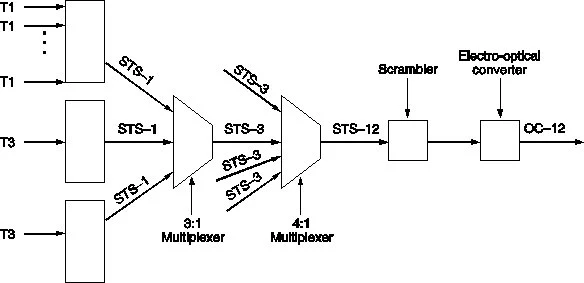
Mux/Demux is a process, shown below, where we take low-speed links and aggregate them into higher capacity links. It all starts with a basic telephone line. Those are known as DS0's (POTS lines). 24 DS0's can be combined to create a T1. Then 28 T1s can be combined to create a T3 or DS3.
These are all copper links though and limited in capacity and distance, they also have clocking complications and are subject to environmental concerns and such complications as DC charge build-up on the transmission line components (See the fascinating history of AMI and bipolar encoding on T1s). As needs grew something else was required. Fortunately scientists had been experimenting with using light for communications as far back as the 1800's. However, a LOT of technological advancement had to occur before these experiments could be put to use in the real world. Physics had to get its understanding to the point of creating lasers, then those had to be shrunk, cheapened, and commoditized to the point of being practical. And then people had to achieve general precision, and then they had to get glass/plastic working to the point we could produce reliably low-loss strands of it at high precision. As a tangent, I highly encourage you go do some investigation on precision. It's one of the most foundational and important components of all the incredible technology - from cars, to medicine, to IT - that we enjoy today and helps us thrive, and it is completely taken for granted. An extreme example of that is Veratasium's video on the chip lithography company ASML.
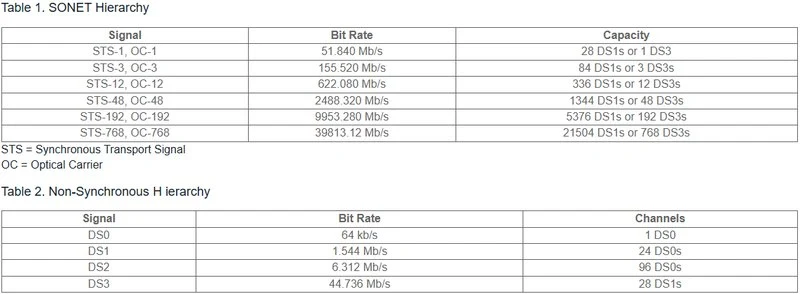
Once fiber and lasers were developed to the point of being commercially viable, AT&T then began experimenting with it in Chicago. Eventually this led to high-capacity fiber systems that could multiplex large amounts of DS0s over them. This was the OC (Optical Carrier) and SONET systems. As progress continued both physically and logically that brought us to the point we are now where most things use ethernet rather than synchronus TDM type systems like SONET or T-carriers. With ethernet, we can differentiate conversations on a per-packet basis, at wire-speed, and the medium itself can operate without the expense and operational overhead of specialized clocks, allowing it to be a bit wild wild west on the lines.
Below is an example of a multiplexing matrix for reference.
Within a normal organization that is not a service provider, we take advantage of fiber for a few different benefits. For one, it is nearly impervious to any kind of outside interference, whereas copper can experience electromagnetic interference from things such as elevators and fluorescent lights. It's greatest benefit though is that fiber allows us to send data a long ways without having to regenerate the signal. At an airport for example, there may be an extremely long run of single-mode fiber around the runway that requires special optics to take data from one side of the runway to another. In most campus networks there will be long runs of outdoor plant (single mode fiber) running across the campus for a few miles in some cases. Within the buildings we use multi-mode fiber to stretch data over distances and speeds that would not be feasible over copper. So let's get into the finer details of this networking medium.
Duplex
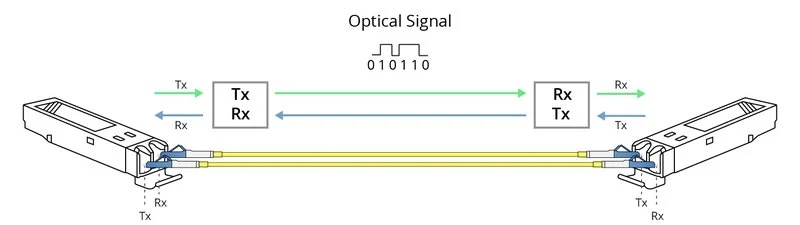
Fiber connections in IT, with some few exceptions, are physically duplex. Meaning, there are two strands or two fibers that make up a full connection. The SFP or optic has two sides, one for RX or receive, and one for TX or transmit. There are ways around this, but we discuss that later.
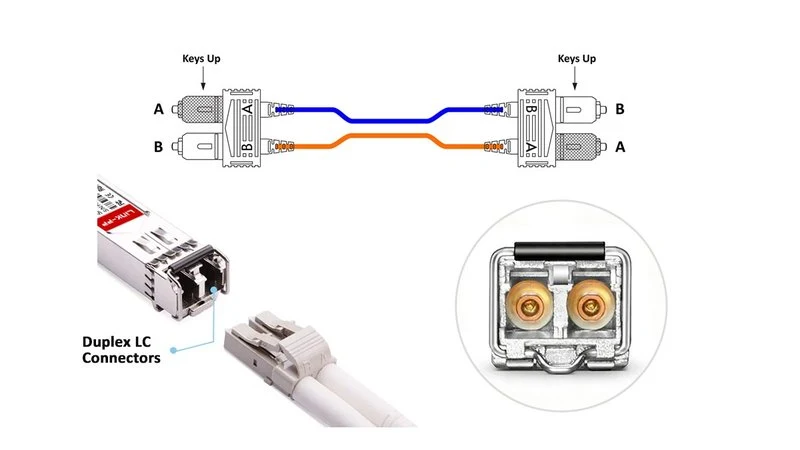
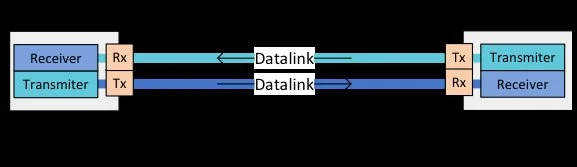
TX on one SFP or optic connects to RX on the other SFP or optic. The light from the laser must be received by a sensor, it can't be received by another laser.
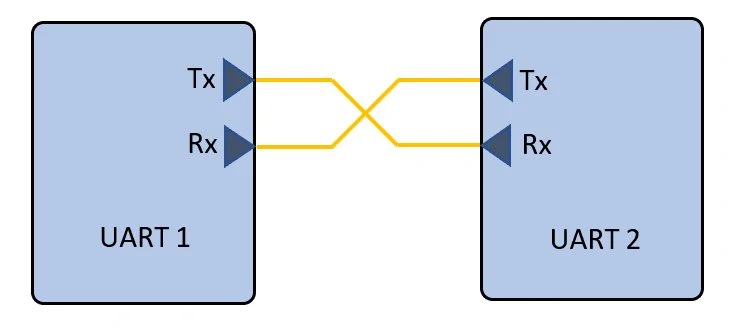
Here are a couple of other ways to visualize it. This is also why you have to roll or flip the fiber cable to get the interfaces up sometimes. They are misaligned sort of. RX is connected to RX and TX to TX, and of course that won't work. So you have to link RX to TX, and TX to RX.
Fiber Structure
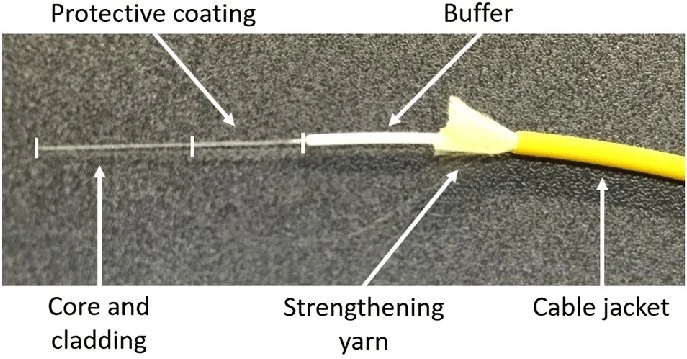
Fiber itself is a bit complex. It has several important structures, out of which 2 are particularly important for what we do (different story if you are an outdoor plant guy). The jacket is the outside protective layer. There are strengthening structures inside of this which often include fiberglass or similar thread to prevent stretching, and a protective buffer layer. Beneath that is the coating, which is a plastic moisture barrier. The last two structures are the most important for our discussion and they are the cladding, and the core. The cladding is similar to the core but provides a lower refractive index interface to provide for Total Internal Reflection. The core is the main carrier of the light.
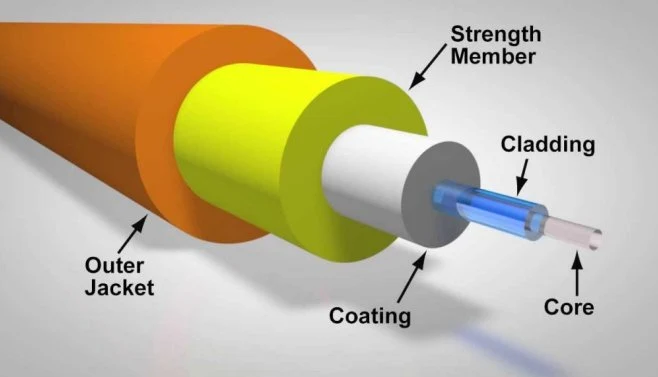
Here you can see an actual fiber cable pulled apart and see its constituent parts. Notice how tiny the core and cladding are compared to the overall size of the cable.
Fiber Core Sizing
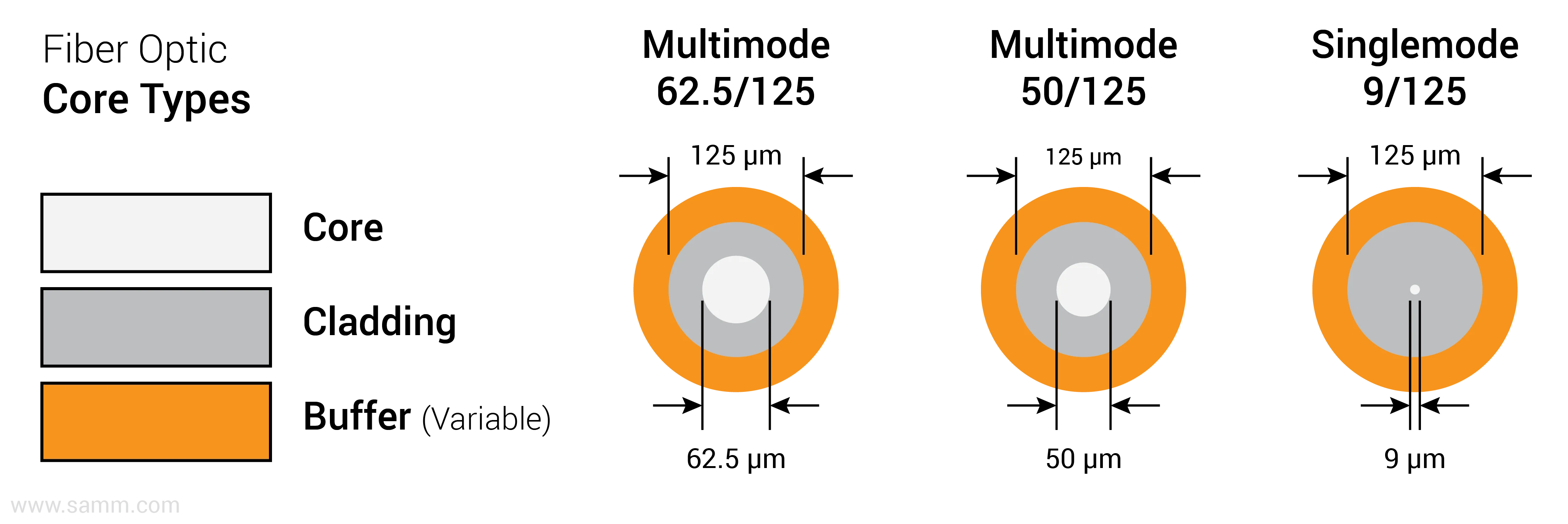
This is a very important reference. Here you can see the physical differences between the various types of fiber and a method we can use for identifying them. Notice that the cladding usually has the same size outer diameter no matter the type. What does change is the core size. FDDI-grade or low-grade old-school multimode fiber has a 62.5 micron (um) core. You may see this also referenced as OM1 fiber. These were originally meant to transport the light from LEDs. LEDs cannot flash fast enough to push gigabit ethernet speeds. So this old fiber quickly runs out of steam when it comes to distance and speed. It can manage about 275 meters with a gig capable laser.
The next one shown (in the middle) is a higher-grade fiber for multi-mode like the OM2-OM5 fiber standards use. These days we usually want to stay with the laser optimized fibers like OM3-OM5. With the smaller core, they are able to reach further at higher speeds, up to 550 meters for gigabit ethernet.
The last one shown is single-mode fiber. This is a high-grade, usually pricier type that supports high speeds at long distances. Notice the ultra tiny core. Usually 7-9 microns.
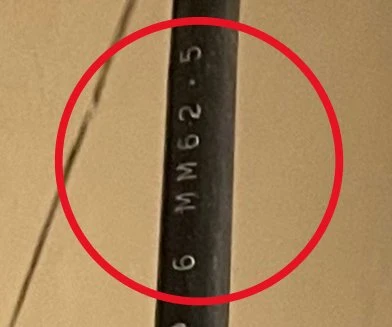
With this info you should now also be able to look at a run of fiber and tell by the printing on it roughly what sort of fiber it is.
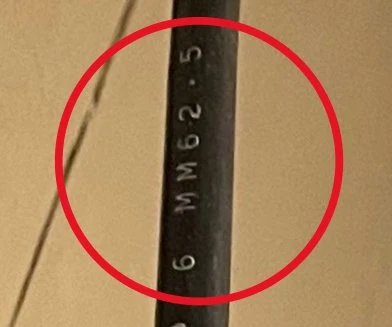
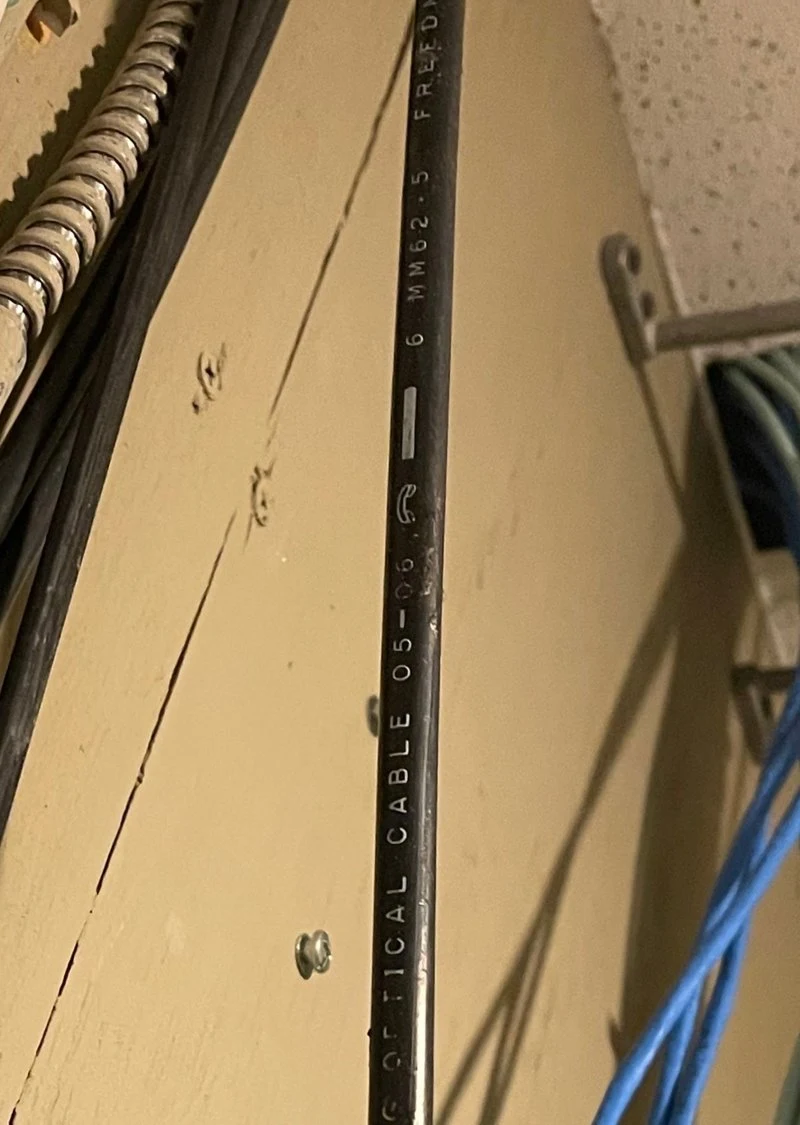
For example, you can see here that this particular fiber cable contains 6 strands of 62.5 micron fiber. So if you didn't have the "MM" there giving a strong hint, you'd know this is multi-mode. You’d also know that it is the lowest grade of multimode we commonly use in IT.
And the box below is a patch panel or patch box for the fiber.
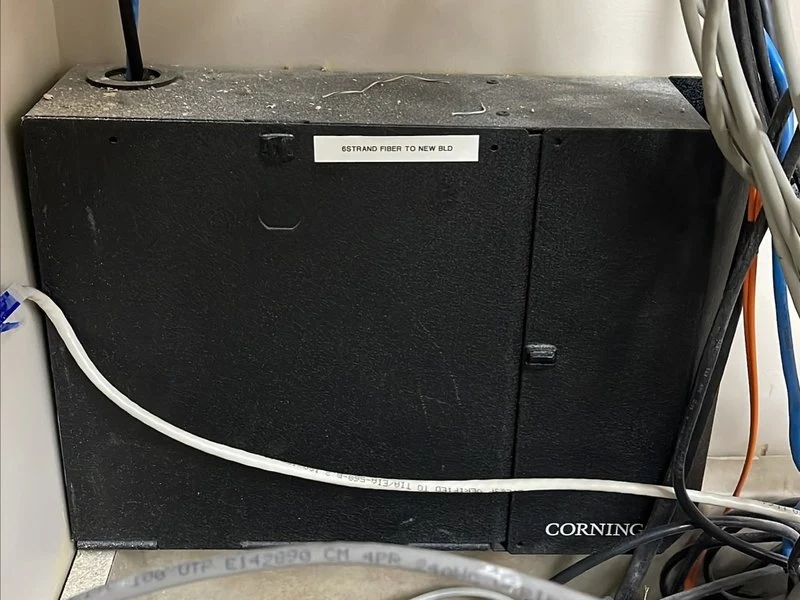
You will usually see wall mount panels or rack-mount panels.
These are termination points with strain relief typically for a multi-fiber cable. If you cracked open one of those panels or boxes, you'd see that each strand has a colored coating allowing the installer to know that the red one on this side is also the red one on the other side.
Within these boxes you'll find different approaches to termination. They can hold what are basically just couplers, like shown on the left below, meaning that the fiber strands in the box are terminated with normal ends. Or, the fiber can be spliced to pre-built pigtails like shown on the right.
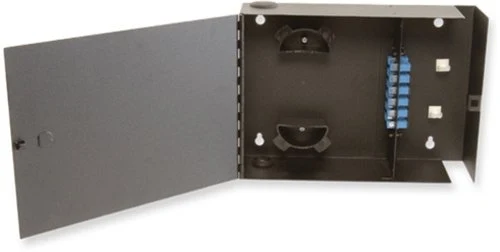
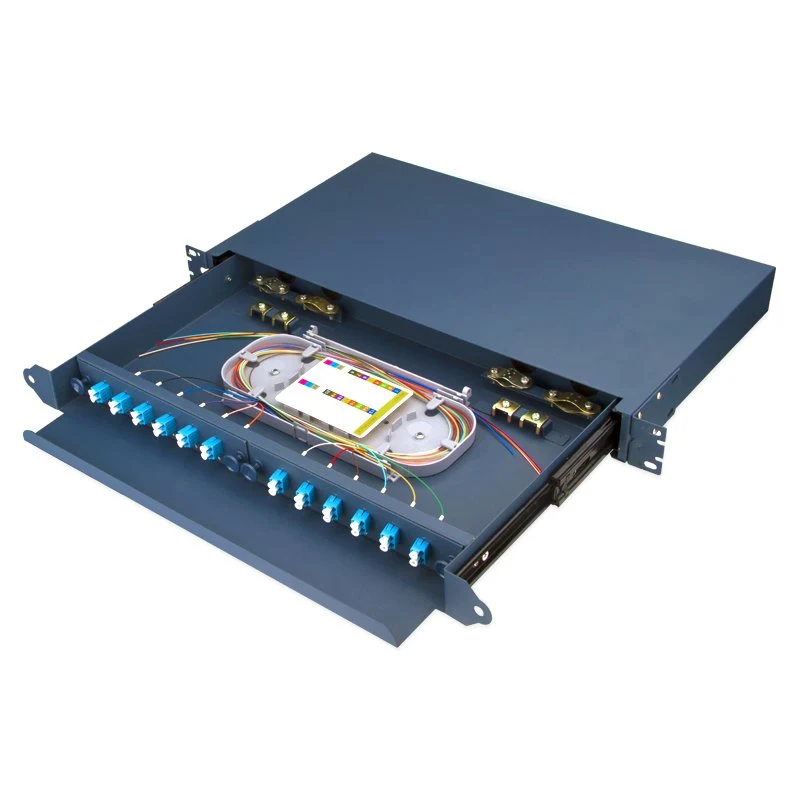
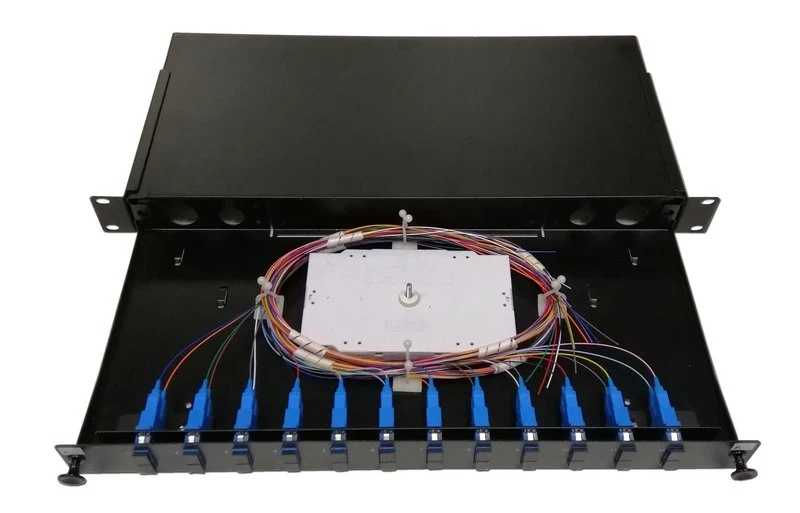
Here's a closer example of what the inside of a rackmount 12-pair fiber box may look like. You can see the color break outs pretty well and may notice that the individual strands are much thinner than you are used to patch cables being. That is because these are all bundled together in a single cable to run between floors or buildings. This is also an example of one with a pigtail that needs to be spliced to the fiber run.
Refraction and angle of incidence
Now we are going to talk briefly about how fiber works. Not only is it interesting, but can help you understand the why of things, the limitations, how to design fiber plant, and how to troubleshoot.
Perhaps you remember light refraction and reflection from highschool, but if not, here's a quick refresher. Refraction is the bending of light as it moves between mediums of different density or refractive index, and reflection is what happens with a mirror where the light is so sharply refracted that it goes back in roughly the direction it came from. Both of these properties are exploited in fiber optics to turn the fiber into something kinda similar to a wave guide.
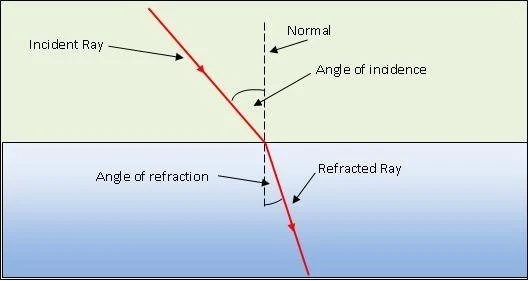
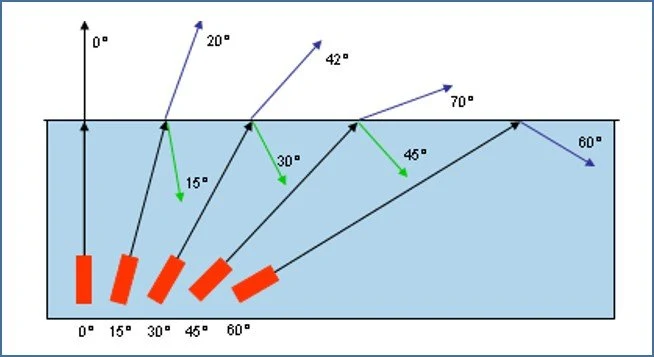
Notice in the image below that as the light enters the denser medium (like moving from air to water for example) it is bent TOWARD that centerline called the normal. As you might expect, reversing that and sending the light from the water to the air bends the light AWAY from the normal.
Total Internal Reflection
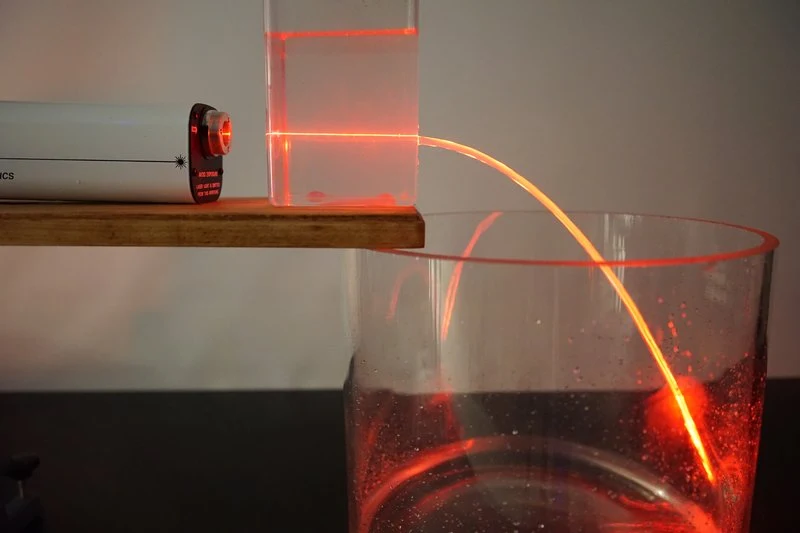
We can use this knowledge to direct the light where we want it to go. Originally using a candle rather than a laser, what's shown here was one of the first fiber-related experiments done in 1841 by Swiss physicist Daniel Colladon. You can see the light following the gentle curve of the water that is leaking out of the vessel, and mostly staying contained.
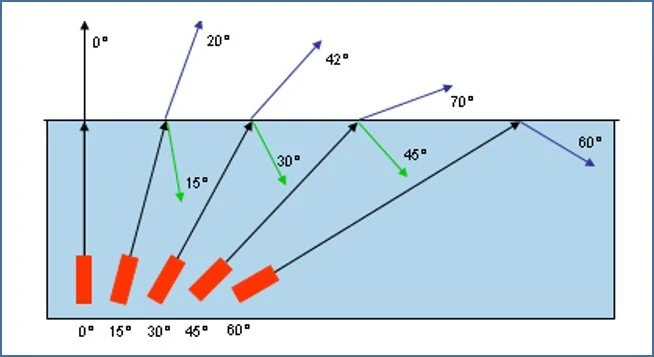
However, if the angle of incidence is too small/too sharp, then the light escapes. What's really happening is as the angle of incidence gets closer to 0-deg as shown below MORE light escapes, it's all probabilistic. But if we send our light in at a shallow enough angle it bounces down the path like a rubber ball. The interface between the cladding and the core recreates this hard divide between a low refractive index material and a high one. Remember that the cladding is the lower, so it is analogous to the air, and the core is analogous to water in our examples before.
Modes & Fiber Types
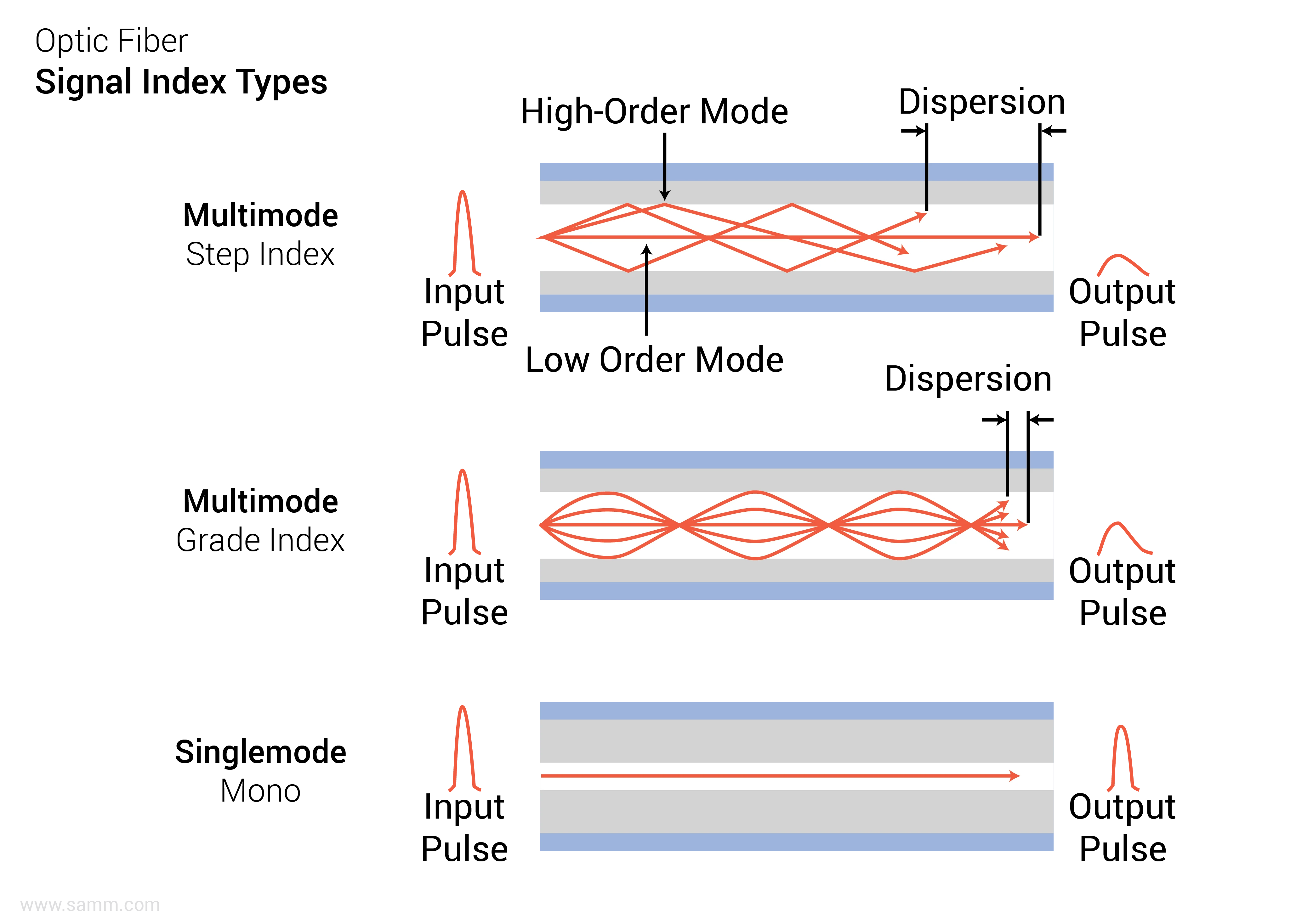
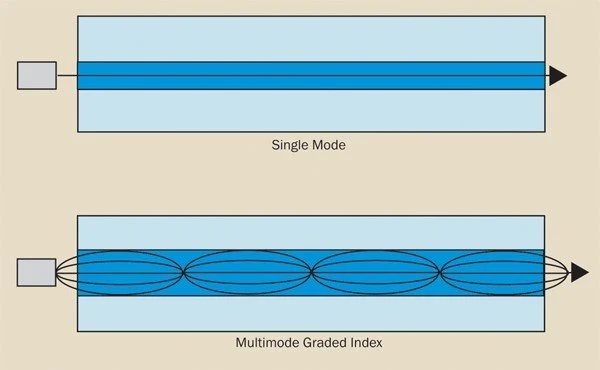
We'll ignore the modes and dispersion for just a second in this image and notice that there are two approaches to multimode fiber core/cladding design. The stepped index method is very low bandwidth and it relies on something fairly similar to what we've discussed so far, you're not likely to ever come across it in modern IT. It has a very harsh interface between the core and cladding.
A better more modern design is a graded index fiber where the core itself has a gradually decreasing refractive index (density) as you move out from the center of it. This is a brilliant use of physics and it gently turns the light as it travels down the fiber, also normalizing the modes quite a bit as you can see here, which reduces dispersion allowing for higher speeds and longer distances. The graded index continually bends the light so that we aren’t very dependent upon the core/cladding interface. Additionally, the graded core helps fight modal dispersion by allowing the higher order modes to move faster in relation to the lower order modes due to the higher density in the center and lower density at the edges.
Now for modes. A mode is NOT a wavelength. We use terms like lambda, color, and the wavelength measurements to refer to that instead, which we will discuss later. Mode can better be thought of as something analogous to a path travelled. You can even have constructive or destructive addition of the modes as they travel down the fiber.
Notice that in the single-mode there is mostly just one pathway for the light, basically straight. But for the graded index multimode notice that several modes are shown, and the grading smooths them out, making them all arrive at roughly the same place at the same time.
Dispersion
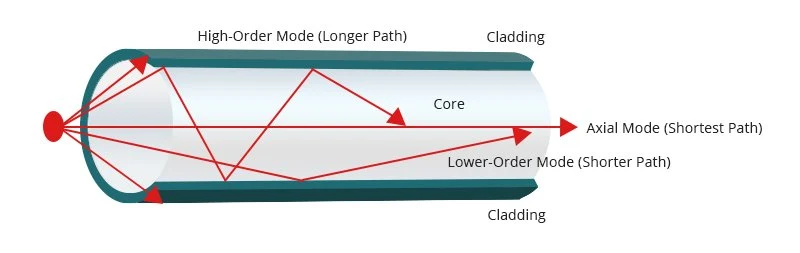
Below is a more interesting diagram of this, with labeling. This gives a great view of dispersion which is also our biggest enemy at high speeds on multimode fiber. The lasers flash, and so each flash is a symbol, or a discrete mess of light modes (also a piece of the actual data or packet). As the light travels down the fiber, the various higher order modes start to lag behind the axial mode, making the symbol longer in time. You can easily imagine how those higher order modes can arrive so late at the destination that the next flash's lower order modes are arriving with them. Which then mixes up the symbols and instead of separate flashes, the receiver now effectively sees just a single stream of light that just wavers in power a bit. And that's not very helpful in conveying data.
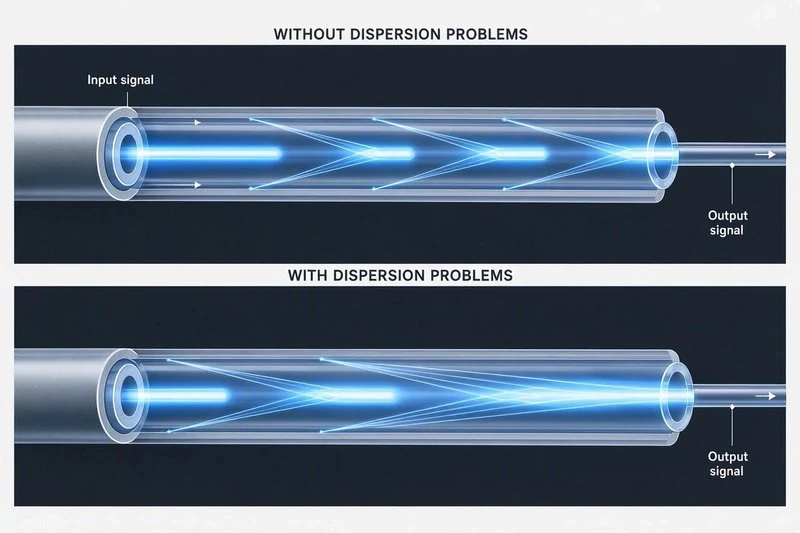
Here is an example showing how the light pulses merge into each other when experiencing problematic levels of dispersion. Single mode does not have much of this problem and instead suffers from other more obvious problems like attenuation.
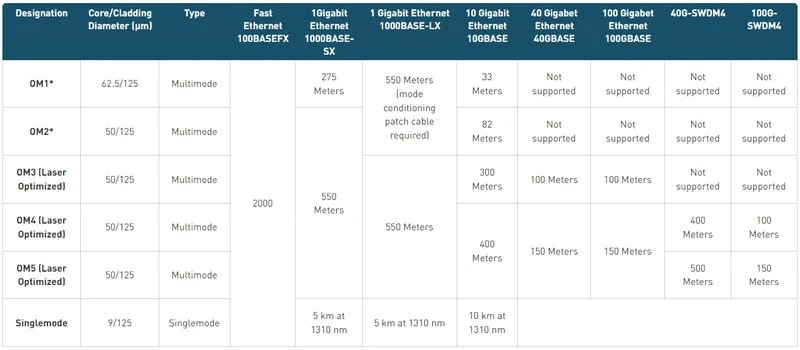
The faster the laser needs to flash, the less distance in time you have between flashes, and the more this becomes a problem over spatial distance. That is why fiber distance and signaling rate have a roughly inverse relationship on multimode fiber, as you can see on this reference chart.
Wavelengths
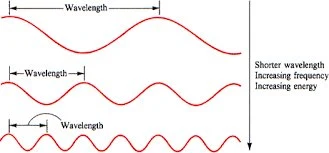
Another differentiator between multi-mode and single-mode is the wavelength of the light that is sent down the fiber. Multi-mode is a lower frequency or longer wavelength of light, and single-mode is a higher frequency or shorter wavelength of light. You will see this listed in interface properties, in fiber properties, maybe even printed on fiber jackets, and it can help you tell the difference between types of fiber.
Identification
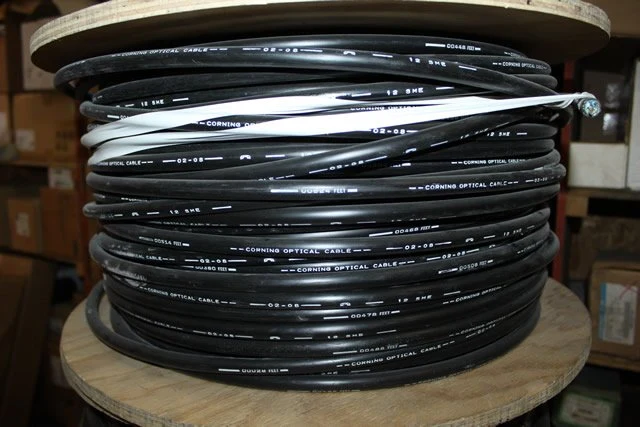
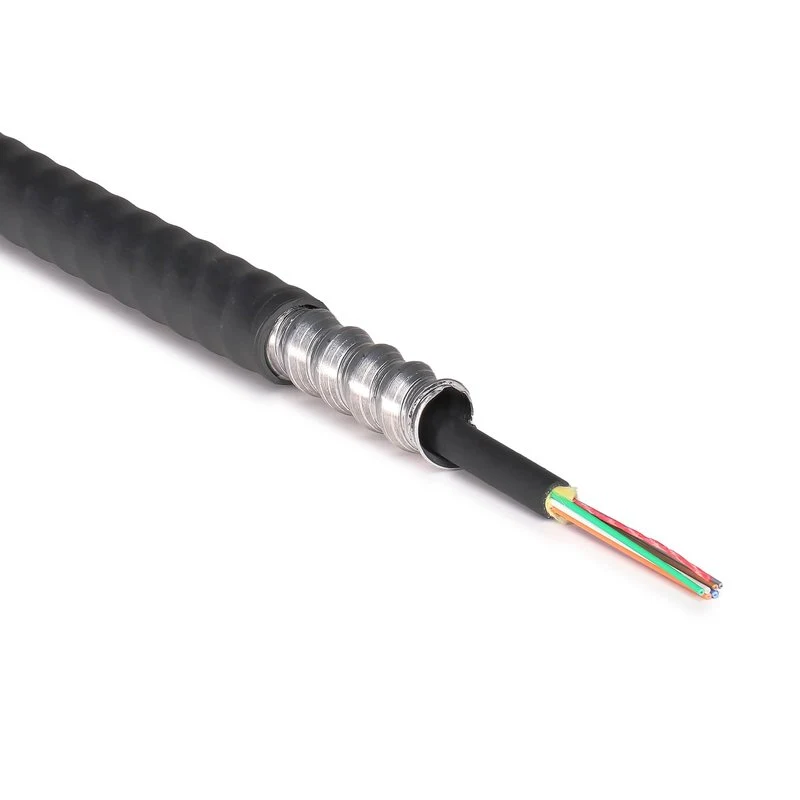
It can be difficult to figure out what type of fiber you are looking at when staring at a bundle. Patch cables tend to be color coded and that coding tends to be consistent. But if you are looking at fiber running through a building, they are often bundled in black outer jackets which gives no immediate visual indicator.
There are some ways to manage that identification. This image from before should now make a little more sense as a method for figuring out what sort of fiber you are looking at. Here we use the core size to give us a hint, as well as seeing the MM printed on the cable. This being a 6-strand FDDI grade multi-mode fiber cable.
Patch Cables
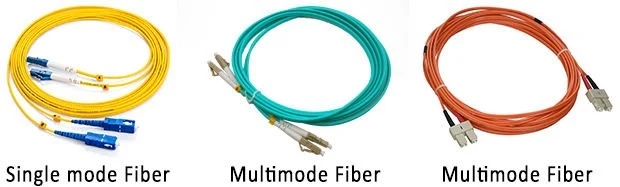
For patch cables it tends to be a bit easier as the colors usually indicate what type of fiber it is. I wouldn't 100% trust it, but about 99%. It's good to verify if you can.
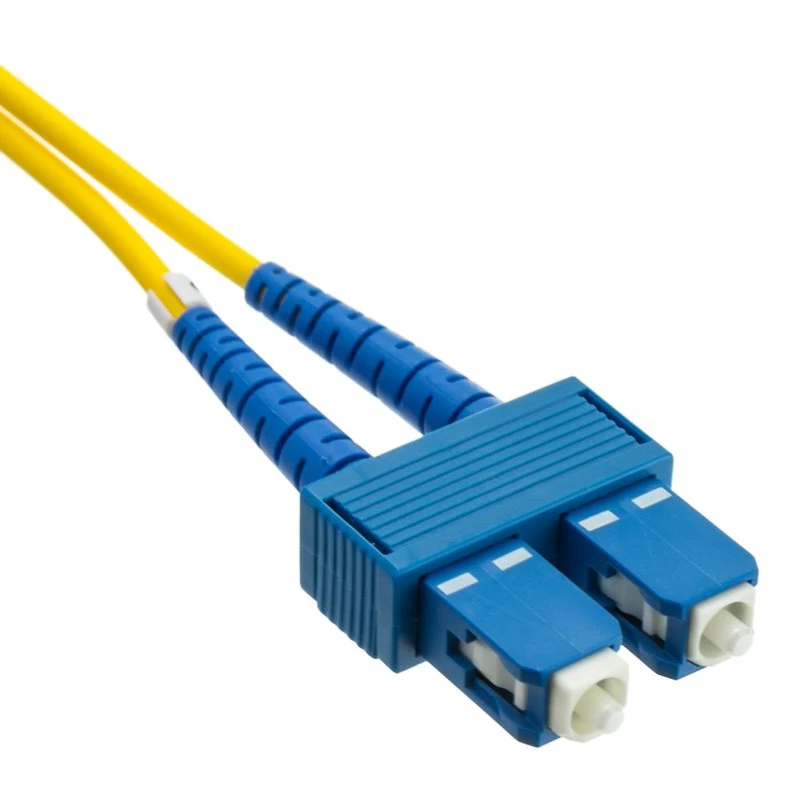
Single-mode patches are usually yellow.
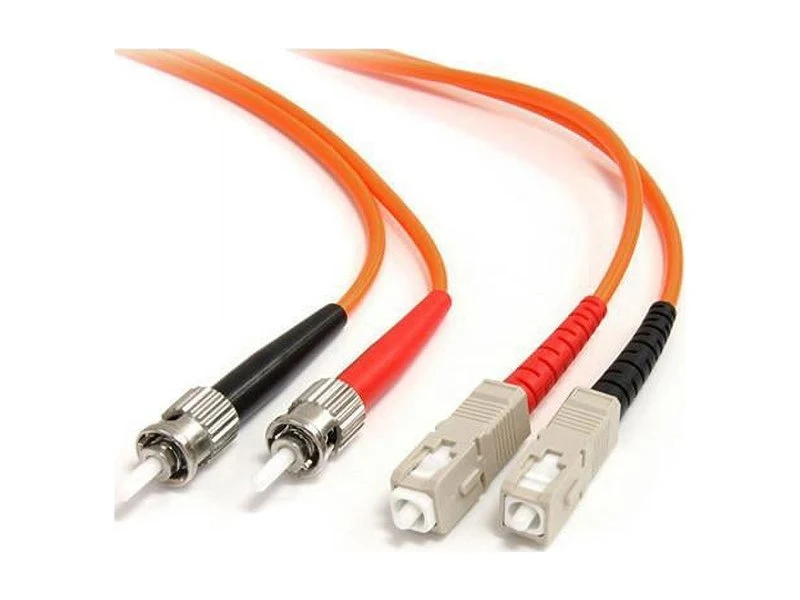
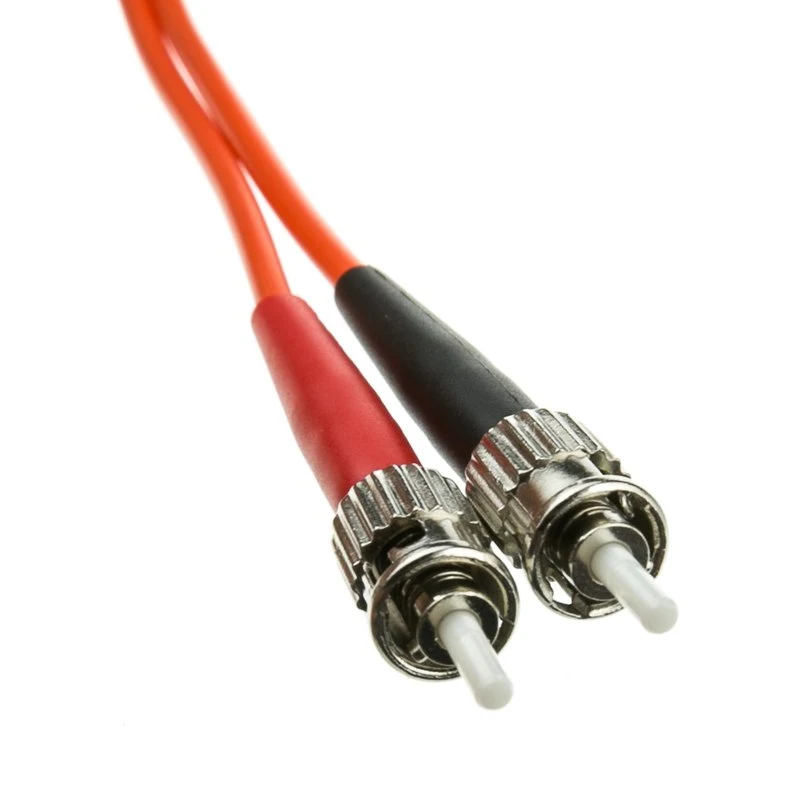
Multimode is usually either aqua or orange. Orange is typically the older 62.5 micron FDDI grade fiber. Aqua usually indicates laser-optimized fiber with a 50 micron core (the higher OM numbers seen on that earlier chart).
You notice on each of these there is a different type of connector. That has nothing to do with fiber type but is another variable in choosing which cable to use or purchase.
Connectors
There are many different types of connectors. Some, like MTRJ or TOSLINK, you will not likely come across. The common ones you will usually see or use in IT are:
SC – Snap Click
ST – Snap Twist
LC – Lucent Connector (Lima Charlie)
These have different purposes.
SC – Snap Click (real name Subscriber Connector)
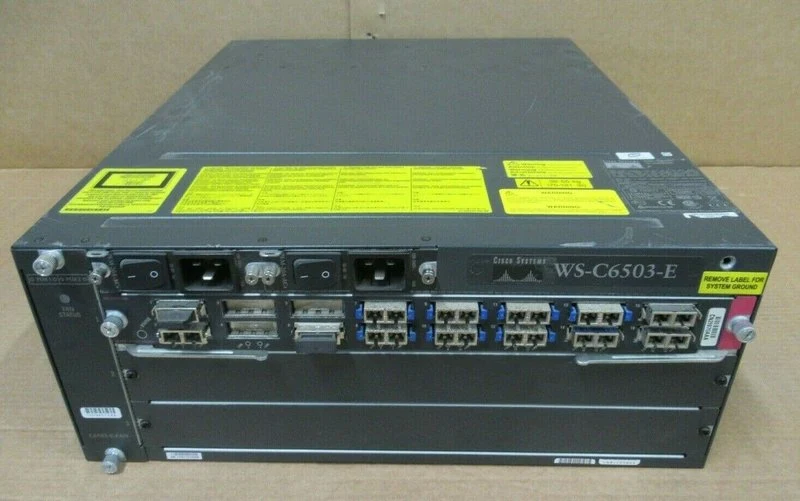
SC or Snap Click style connectors just pull in or out of their respective mating. These days you will almost exclusively see these on fiber boxes or fiber patch panels. Back 20yrs ago or so, before interfaces got smaller, these were also on network equipment. You shouldn't see that much anymore.
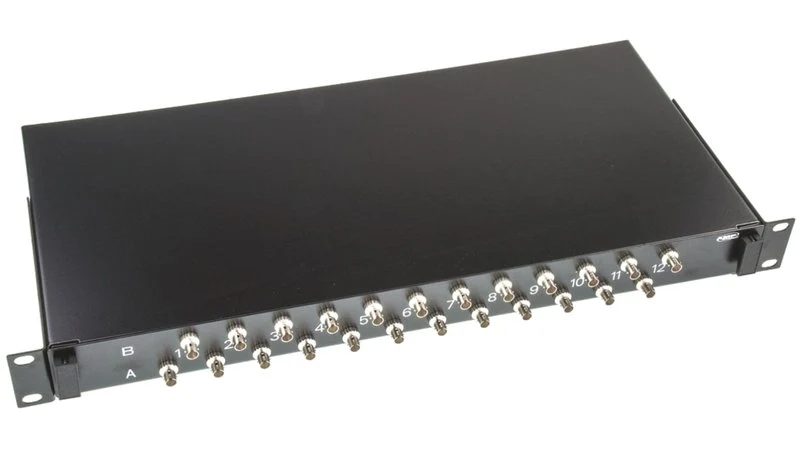
ST – Snap Twist (real name Straight Tip)
ST or Snap Twist connectors are more robust and good for places where the fiber may be pulled on or otherwise physically in danger. It's rare to see these on equipment. Mostly I've seen them on media converters and industrial gear (discussed later). Usually I just see them on fiber patch panels though.
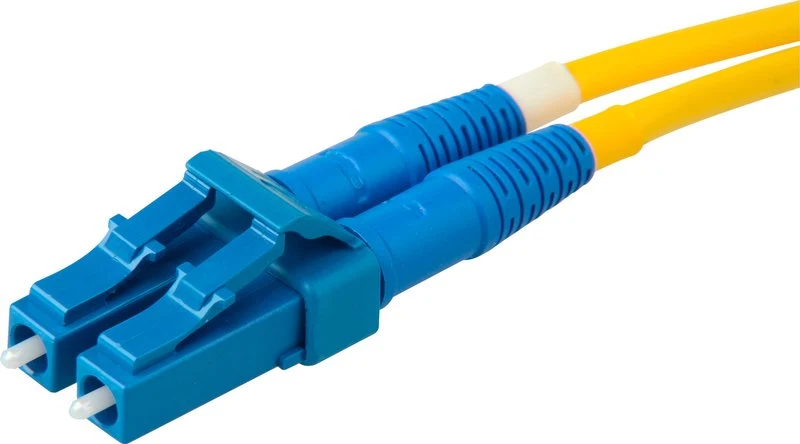
LC – Lucent Connectors
LC or Lucent Connectors are mostly used on modern equipment. These are small and allow for high density. They are modular and have a little clip on them you can take off to flip them around (discussed later).
Fiber Interface Modules
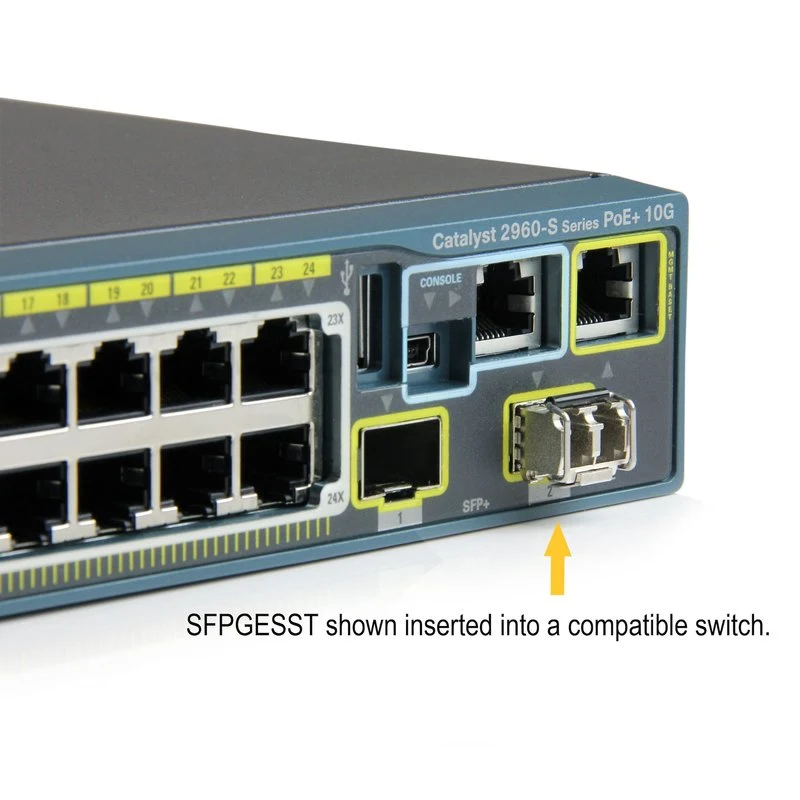
On the equipment side, we have some common choices for the type of interface we use. Because there are so many variables with fiber, manufacturers have moved to a modular approach. The larger piece of hardware, like a switch, has ports on them. These ports don't take the cable directly, but get an interface module placed in them, which then takes the cable.
This is far from exhaustive, but the most common examples are shown here.
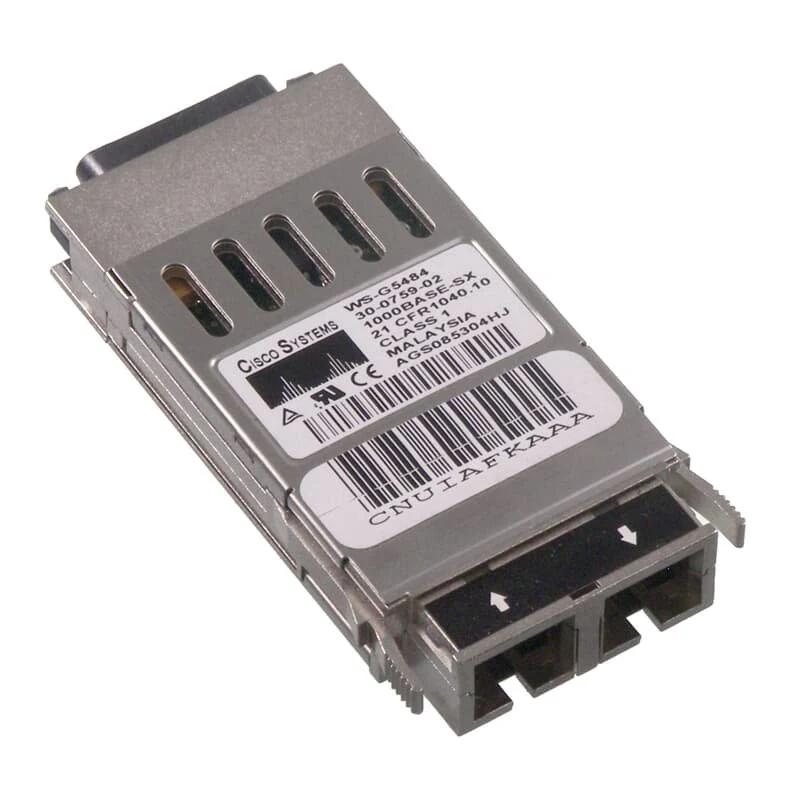
If you've been around a little while, you've seen GBICs. Those are not usually in use anymore and typically only supported 1 gigabit or lower speed interfaces.
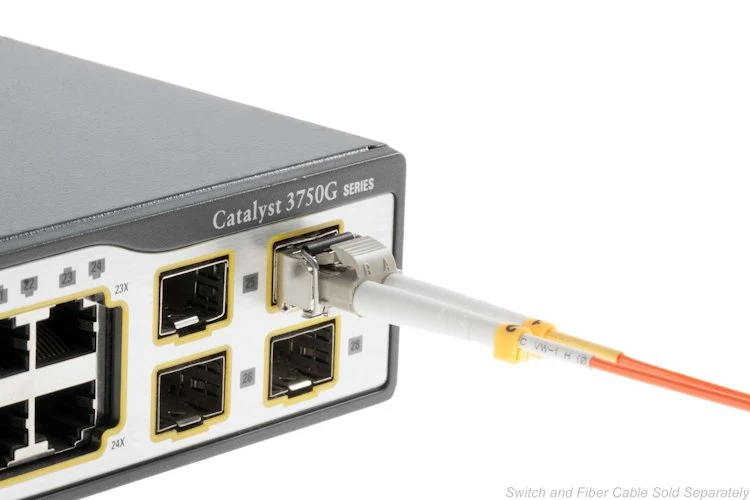
SFPs are the update to GBICs. SFP stands for Small Form-Factor Pluggable. It's a terrible acronym. Should maybe be SFFPM or something, but they didn’t ask me. SFPs take LC connectors and allow for high density fiber switches. These are also 1 gigabit or slower and very 2012.
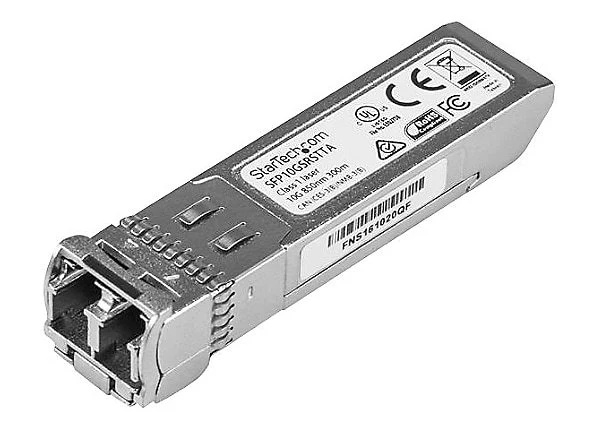
The new hotness is the SFP+ module which supports 10 gigabit or higher speeds. Physically, they look like the regular SFPs.
There are other types of modules for specialized applications, particularly certain approaches to 40 and 100 gigabit, but I have left those off here for now as you still don't come across them much outside of datacenters and there are several different ways to address the problem of 40 gigabit and higher that will just muddy the waters of this discussion.
Notice that none of these do much speed negotiation like you are used to with copper interfaces. The 1 gigabit interfaces have a 802.1z/802.3z negotiation capability but that is for duplex and things like pause frames only. NOT speed.
If you get a 1 gigabit fiber interface its signaling rate is 1 gigabit. There are some exceptions to such things, like 10/25G interfaces, but when you come across such things they will usually stand out.
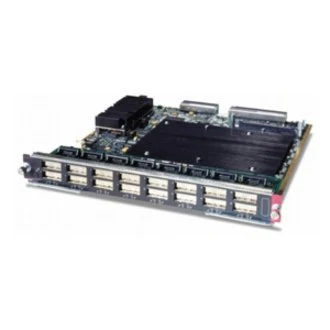
GBICs
GBICs are older, here you can see the low density caused by their size.
SFP
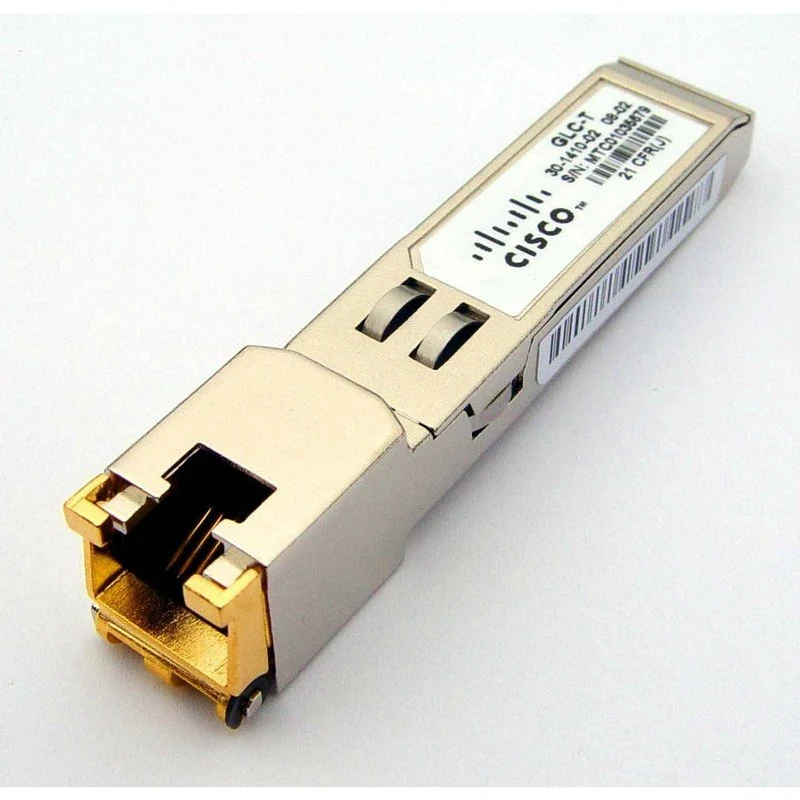
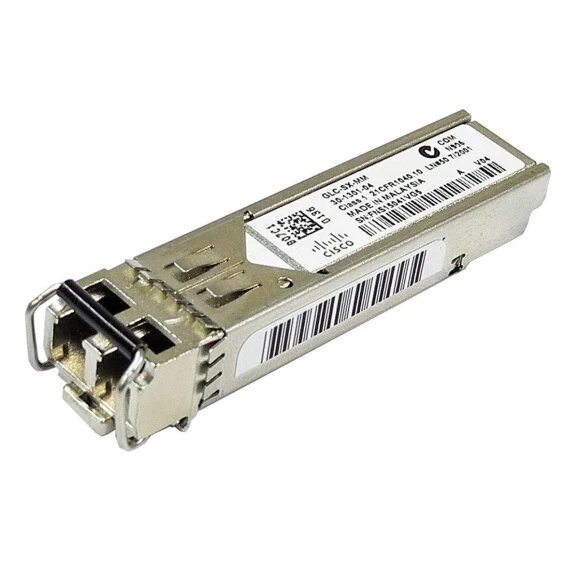
Here's an example of SFPs and their use. In this case I am also showing a copper SFP. This could be useful for example if you need a copper gigabit link in a fiber switch.
SFP+
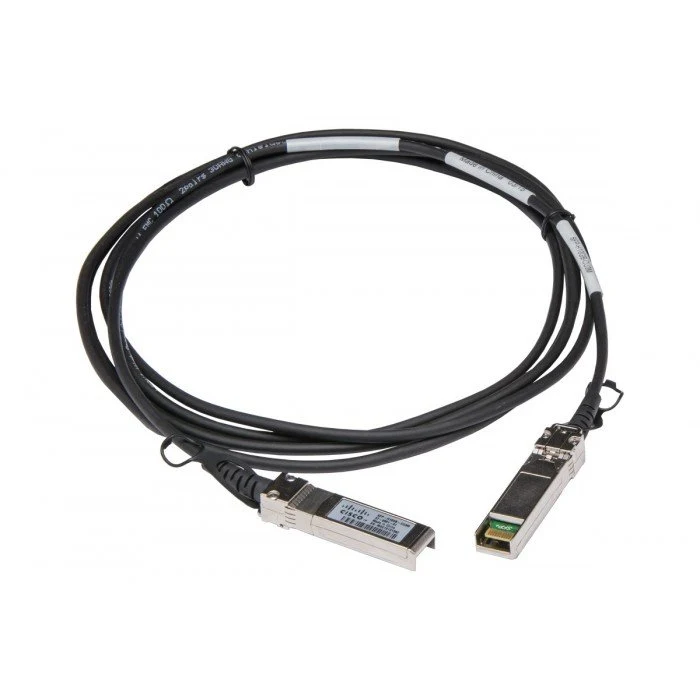
This is an SFP+ and you can see that it doesn't really look different on the outside. It just supports more speeds and such. I'm also showing something that you may come across called TwinAx, which is a copper medium that has the SFPs built on to both ends from the factory. These are supplied in specific lengths, and there are active and passive versions. Be careful of that active/passive thing, as it will cause you all manner of headache. Pay attention to the requirements and limitations of equipment on BOTH sides of the TwinAx link.
Active Optical
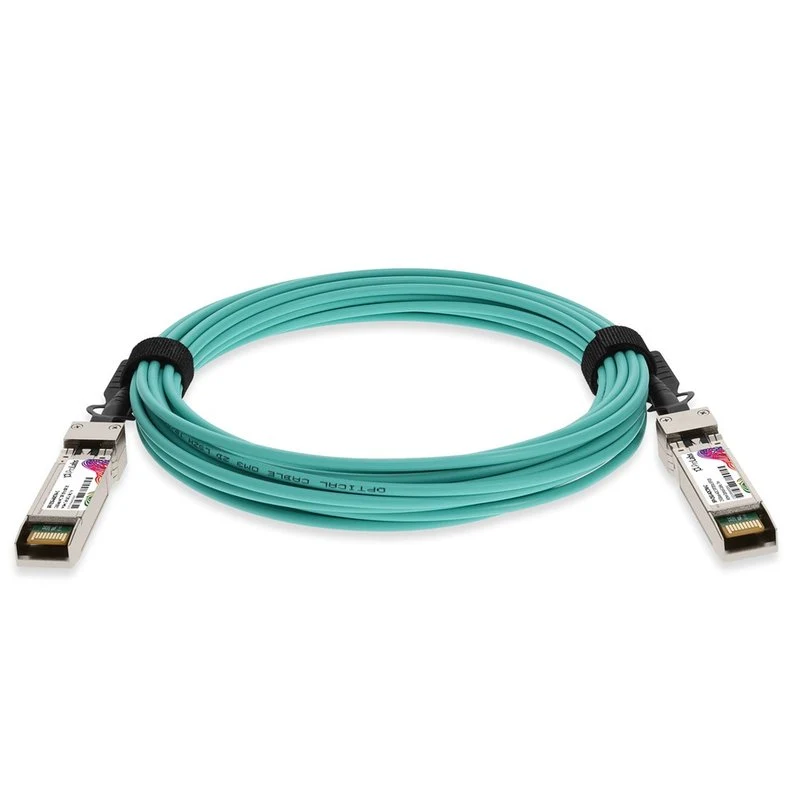
There is a similar pre-built fiber cable that has SFPs molded into both ends. You will see these used in closets some as well as datacenters. They are called Active Optical Cables (AOC), and I'm not aware of any particular issues with them because they don't have special power requirements, unlike the TwinAx cables.
SFP or Interface Types
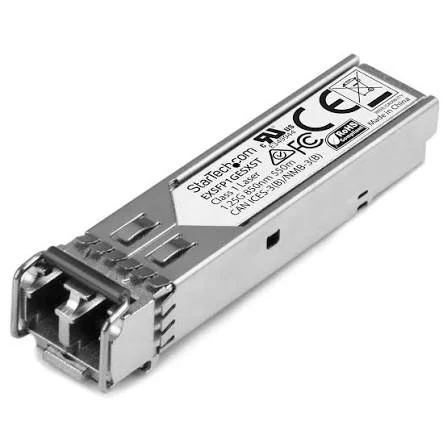
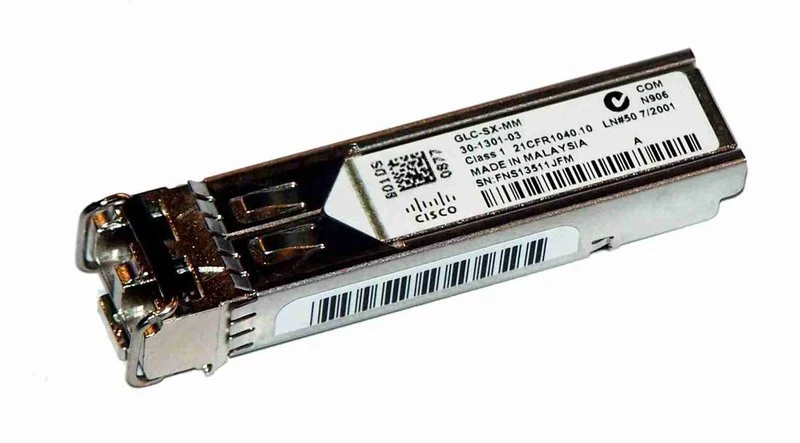
There are many different versions of SFPs. When ordering, you need to know EXACTLY what you need, as they are rarely flexible. For example, a multimode SFP or optic on one end of the link connected to a single-mode optic on the other end will not work. Likewise, a 10g multimode on one end will not link up with 1 gig multimode on the other. So you need to match speed, fiber type, and distance support.
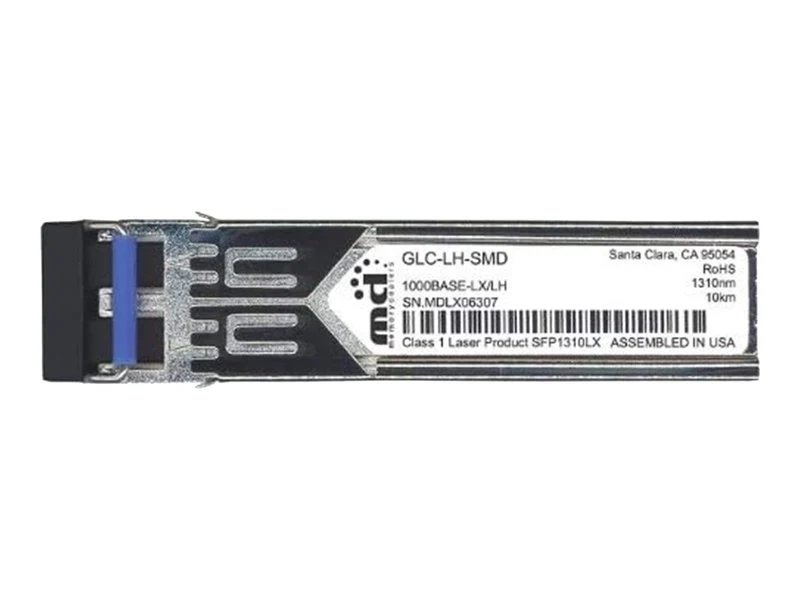
On the SFPs there are common designators for these properties. For example the SFP shown in the middle is a 1 gig standard range singlemode optic. I know this by the LH in the part number, and the label below that shows 1000Base (1 gig) LX/LH.
A decoder ring for those common designators is shown on this slide:
SR/SX – MultiMode
LR/LX/LH – Standard Range SingleMode (10km)
Can be used over MultiMode with caveats
Distance depends on fiber grade
May require mode conditioning cable
Use caution over short distances
Use attenuators or wrap it
ER/EX – Mid range SingleMode (40km)
ZR/ZX – Long range SingleMode (70km
Cable Plant Limitations & Work Arounds
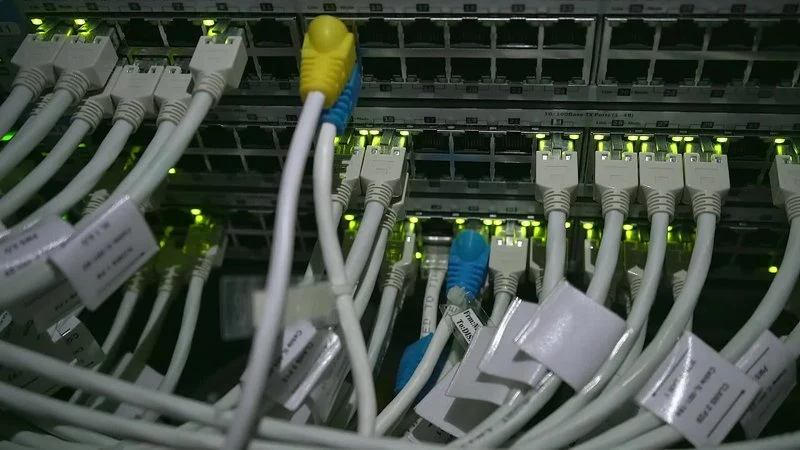
Sometimes you will run into problems with your cable plant and its compatibility with whatever gear you are using. Maybe the network device doesn't support fiber. Or maybe there is no network device at the termination point. Maybe you need extension from a demarc. Maybe you have different fiber plant than is optimal or supported by your network equipment (like legacy fiber).
Media converters
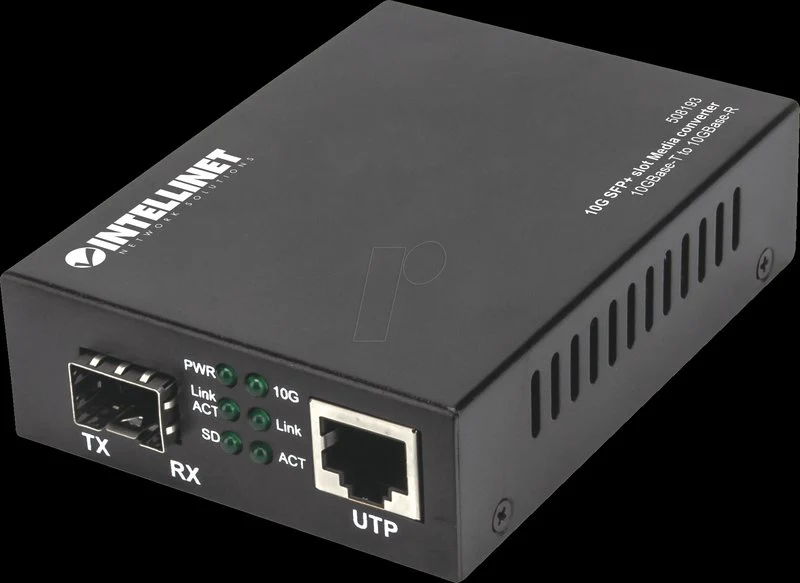
A lot of those problems may be solved by what is called a "media converter". These devices can translate between fiber types, network types, speeds, etc. Most often you will see them converting from fiber to copper and vice-versa. But they can also convert from multi-mode to single-mode.
However, there is a trade-off. They are yet one more device to break, and another device to support. Another device with an MTTF (Mean Time to Failure).
Also, keep in mind, anecdotally, in my experience, these do not do well when connected to a network device on the other end. They seem to be most reliable when connected media-converter to media-converter.
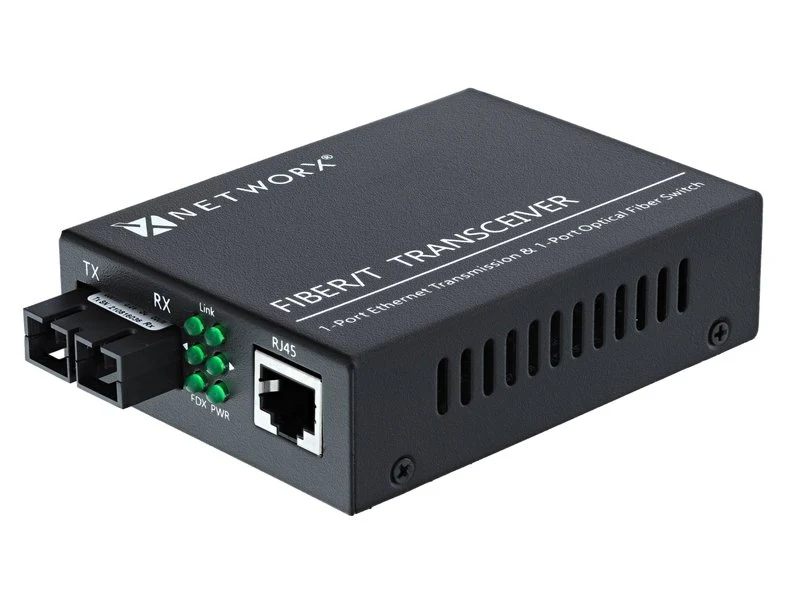
Mode Conditioning Cables
You also have another, less known option, for dealing with sub-optimal fiber plant. Pay attention to the distance limitations (the chart on slide 18 addresses this in the 1000LX column), but you can run LX/LR/LH optics (which are single-mode optics) over multi-mode plant. You won't get single-mode distances out of it, but it is a solution to certain problems.
However, when doing this beyond a few meters, you will need to use what is called a "Mode-Conditioning Patch Cable" to get the best reach and reliability out of the situation. This cable is a VERY special construction that controls the laser launch angle into the multi-mode core.
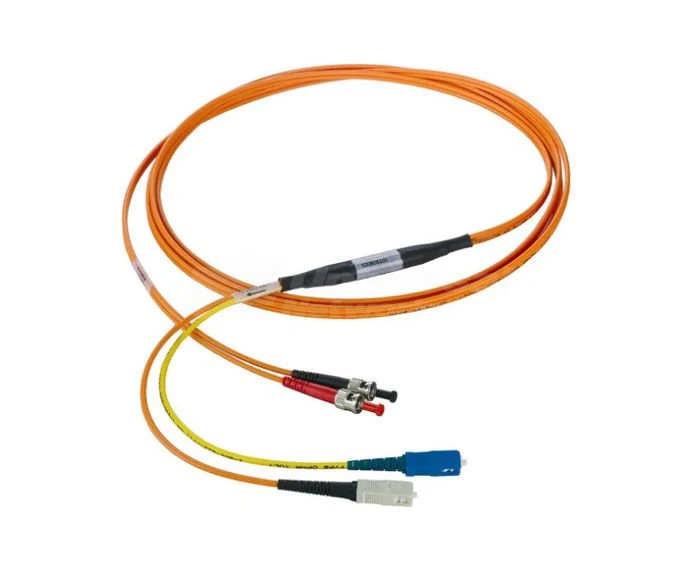
Internally, the mode-conditioning patch cable looks something like this.
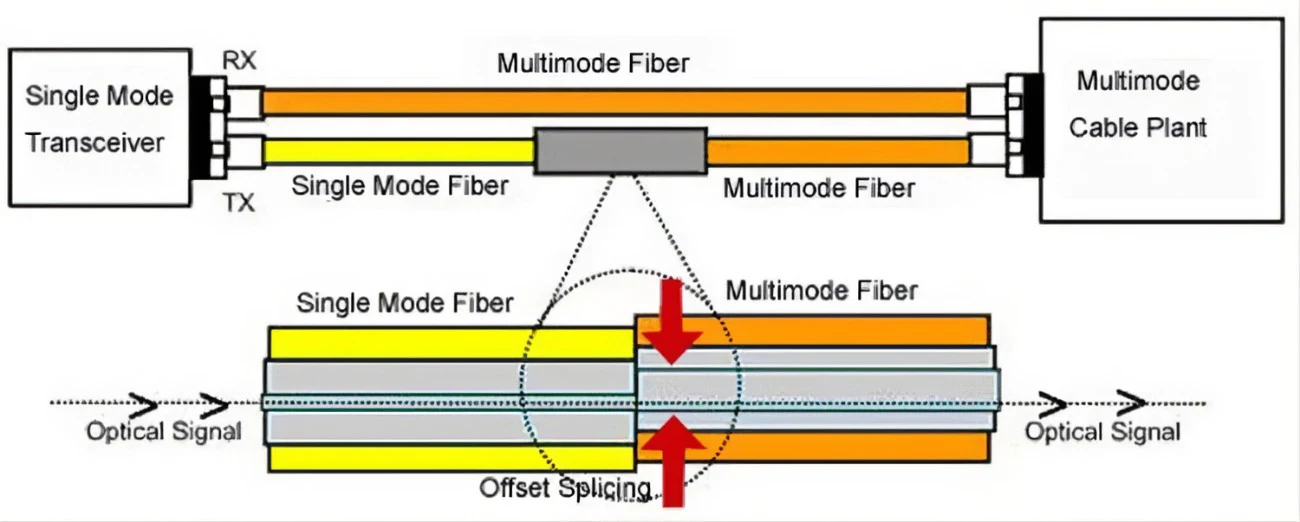
Notice that it uses an offset splice to set it on the optimal path through the core, controlling bounce (mode) to some degree. That is, it controls dispersion.
To do this, you will be using an LX/LH/LR optic on both ends of the fiber. Remember that optics don't have cross-compatibility, you could not use a multi-mode optic on one end and a single-mode on the other as they send and receive completely different wavelengths.
You also need one of these cables on both ends of the link plugging into each respective network device. The splice goes on the TX side in each case (not needed on the RX side as it is already aligned at the sending side laser).
Problems
In this section we will discuss some common problems you might experience, then talk about troubleshooting fiber.
Signal Loss or Degradation
There are several common problems you might encounter that cause signal loss or degradation.
These include:
Attenuation - this is what you might expect on an excessively long run, as it refers to signal power loss. More often a problem on single-mode than multi-mode. It can be due to a run that is too long, or a bad fiber that is out of spec.
Differential Mode Delay - this is the main distance limiter on multi-mode like we discussed earlier. It is the inherent dispersion that occurs due to high speed laser flashing and many modes on the fiber.
Imperfections - these can cause dispersion or attenuation.
Bends - excessive bend radius can increase the angle of incidence into the cladding far beyond that expected or spec'd for on the fiber, which then leads to attenuation.
Crushed or Broken ends - these can be on the connectors or within patch boxes or panels and can cause attenuation, diffraction, reflection, or dispersion.
Bad splices - this has the same result as crushed or broken ends, but occurs either in spliced boxes and panels, or down long runs of fiber (usually outdoor plant) that contain splices.
Excessive TX power - can also cause problems just like too little power can. This overruns the receiver in the far-side optic causing bit errors in the equipment, and if bad enough, can actually damage the optic. Imagine putting two optics intended for 70km only 2m apart. It would be like suntanning in the Sahara with no protection.
Fiber Signal Loss
As discussed earlier, this is the main distance limiter on multi-mode fiber. And it is the modal dispersion caused by the different actual path lengths of the various modes.
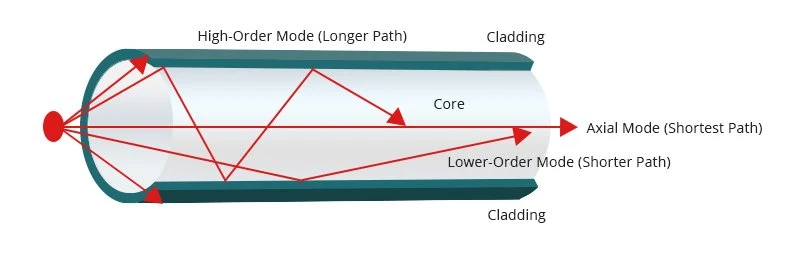
Excessive bending can cause extreme angle of incidence which sends some of the signal power to be absorbed into the cladding. This is usually a bad thing, but as we will discuss in a moment, you can exploit this fact to your advantage in some very particular scenarios.
RX/TX Mismatch
Mentioned previously, fiber is usually run as a physical duplex pair. Pay attention to your RX/TX linkage. This is usually the first thing to suspect if a fiber link does not come up. Think of it like someone whispering to your mouth…that don’t work too well. But if they talk into your ear – that is, they aim their transmitter at your receiver – you tend to be able to make out what they are saying much better.
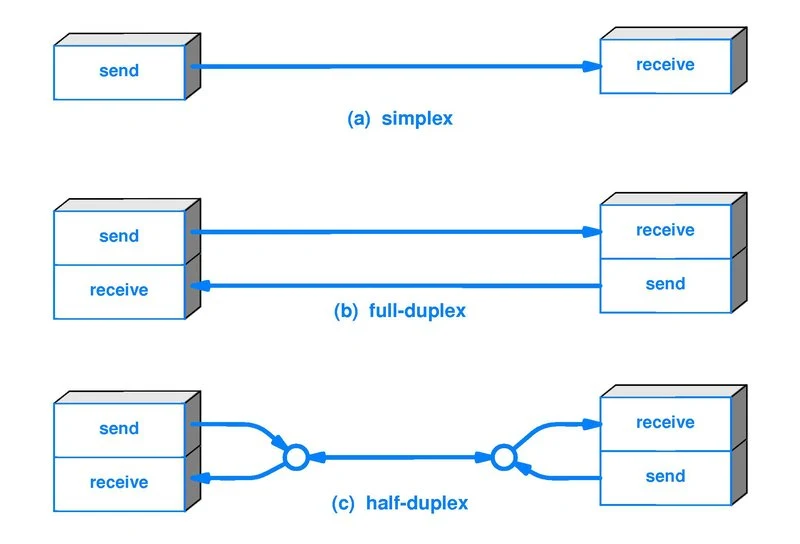
Rolling the fiber can be especially annoying when you have to do it with LC ends. There are a couple of video links here that help with some tricks for that.
https://www.youtube.com/watch?v=MkJWhzWFoyI
https://www.youtube.com/watch?v=OKtF97VT8ts
Bit Errors
During the termination process or manufacturing process ends can be crushed or poorly terminated. Also be careful with fiber handling. Fiber is not as fragile as most think, but still...be reasonably gentle with it.
These issues can result in Bit Errors that will often show up as generic “input errors” depending on your equipment.
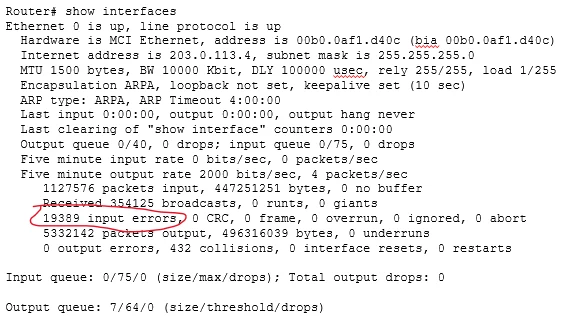
Signal Strength
You can have too little signal which will cause bit errors or interface state changes.
Conversely, you can have too much signal, which will also show up as bit errors.
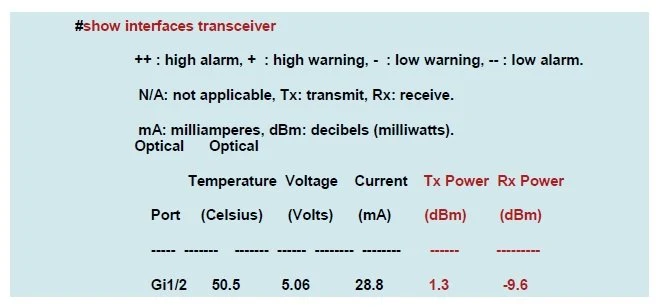
This example is correct (within tolerance) but shows the allowed range.
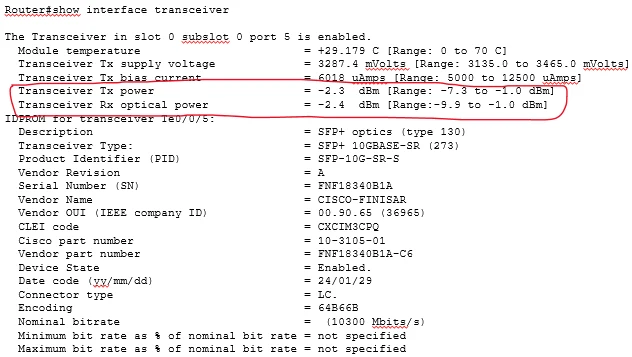
DOM – Digital Optical Monitoring
The capability to see the signal strength and similar properties on the network equipment itself is a feature called DOM or Digital Optical Monitoring. It has to be supported by the device, the OS, and the SFP or optic. It's fairly common these days in enterprise grade gear though, and really useful for troubleshooting.
Attenuation
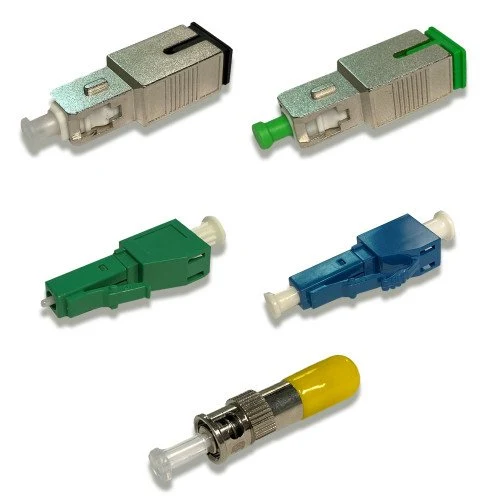
If you are verifying through DOM, or you find bit errors that take you down the troubleshooting path, and you find the signal is too hot, you have a few options. The best, most supportable, and professional answer is to purchase and use attenuators. These are little calibrated couplers that reduce light power by a set amount (usually) like 5dB for example.
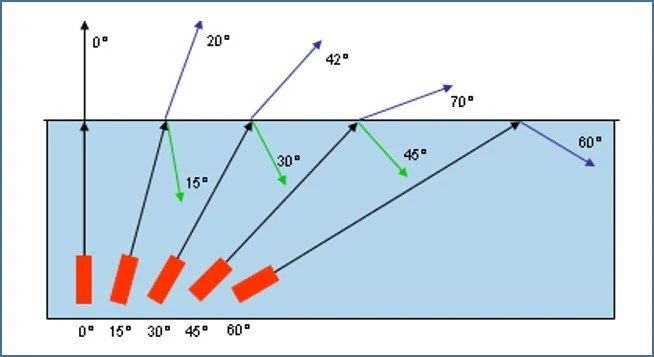
The "OMG I just need to get this line up right now" approach is a bit different. In that case you have two options. You can get a really long patch cable, which may attenuate the power enough. Or, you can abuse the knowledge you now have and exploit the property of angle of incidence with the short patch cable you have. If you wrap the patch cable into a loop, tighter than it should be, outside its specs, you can force some of the light to be absorbed by the cladding. This might be wrapping it around two or three fingers. Just be careful, don't break it. This is not supportable and should be VERY temporary.
OTDR
In outdoor plant, things are much more difficult as you might imagine. As the cabling is either buried or arial, and often spliced in all sorts of places, it cannot be easily investigated physically.
These long outdoor runs (often miles long) can have bad splices, crushes, or cuts.
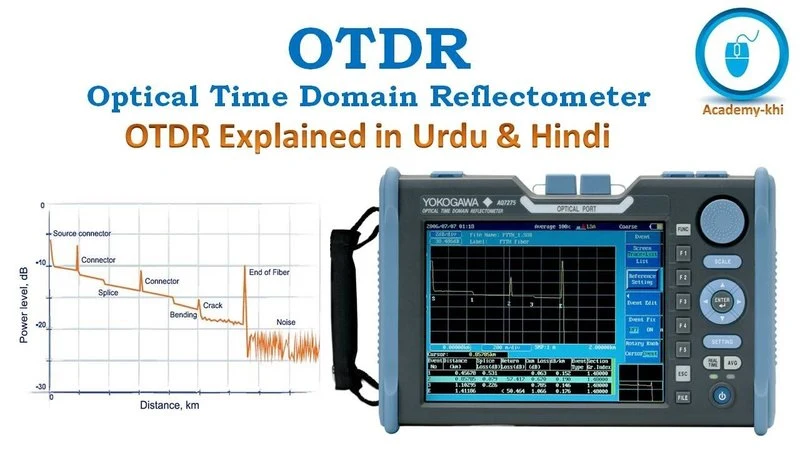
The primary way to troubleshoot those is with an Optical Time Domain Reflectometer (OTDR). It is a fairly expensive piece of gear that the service provider will have to use. It works a bit like radar. It shoots light down the fiber and measures distance to reflections.
The image to the left shows an example of what the OTDR displays. You can see connectors, splices, and other issues in the fiber, and tell how far away they are from the OTDR.
Fiber Lights and Meters
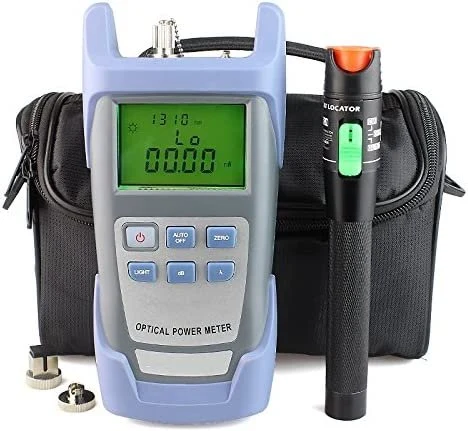
On multi-mode fiber runs (and sometimes on shorter single-mode runs) you can use a much cheaper bit of testing gear. This device can be used to ensure that you are on the correct fiber pair by shooting a light down the fiber. Often this light is strong enough to see coming out of the fiber against your hand. A good one can also check for attenuation on the run.
Do NOT look into a fiber directly. You may be able to see a multi-mode laser, but it is not safe. Single-mode lasers cannot be seen and are vastly more powerful and can definitely damage your eyes.
Signaling Rate vs Bandwidth
A word about signaling rate versus bandwidth. Signaling rate is the clock rate of the link. Just because a link has a signaling rate of 100Mb/s does not mean you can get anything close to that rate down the line.
Bandwidth is the actual amount of data over time that you can get down a path or a link, and its upper limit is the slowest link in the path. It doesn't matter if your laptop has a gigabit interface, if there is a 100Mb/s link between a couple switches in your path, you're getting a max of under 100Mb/s.
Bandwidth is determined by all sorts of things like hardware limitations, configurations, link problems, QoS policies, various delays, LFN (Long-Fat Network) problems, etc. For example an old Cisco 2600-series router was only able to push about 60Mb/s even though it had 100Mb/s interfaces because the processor and such was only able to reach those speeds. The clocking rate or signaling rate of the link described how fast the packets zipped down the line once they were on the link.
Negotiation
The gigabit standard 802.3z sets an auto negotiation mechanism. It is not the sort of auto-negotiation you are used to. It does NOT negotiate speed. Instead it can negotiate things like duplex capabilities, pause frame support, and does some fault detection.
Often service providers have this set to off. The setting almost always needs to match on both ends of the link.
IRL Troubleshooting
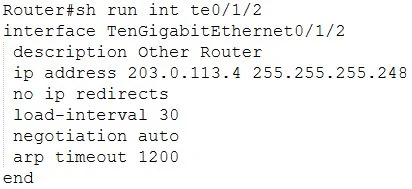
Putting it all together, let's talk through a real scenario. I worked for a place that didn't have any networking people before I was brought on. They had been working on a fiber link at one of their customers for months, and it did not go well. In their defense, they didn't have any network experience, and multiple people tried different things over a long period, having to travel a long distance each time. A sort of spaghetti on the wall approach, throwing things at it to see what stuck.
This was a manufacturing customer with two buildings on their campus. One was a smaller admin type building where the fiber internet link came in from the service provider, and the other was a good ways across a field and was the actual fabrication building.
To begin with, when my company ordered the internet line for the customer, they assumed that the building-to-building run was Single-Mode fiber. They did not verify. They also assumed the signaling rate from the service provider was 100Mb/s when delivered. It was 1Gb/s. An aside here, the reason they made this second assumption is because they ordered a 100Mb/s line. But a 100Mb/s signaling rate is usually not what's delivered by AT&T for such, because that would only provide about 93Mb/s of actual bandwidth due to overhead and such. So they typically install a 1Gb/s signaling rate link and police it down to near 100Mb/s which takes the overhead into account.
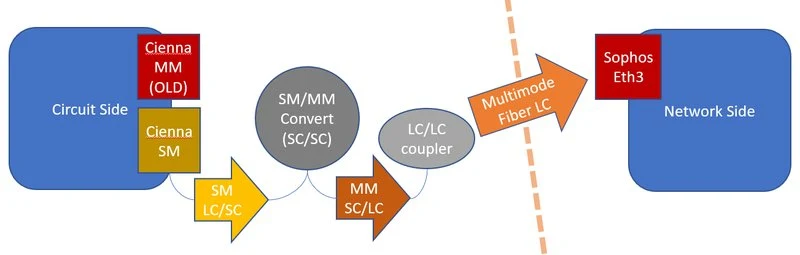
Because of the first assumption, they wound up purchasing a single-mode to multi-mode media converter and installing a multi-mode 1Gb/s SFP in the firewall. However, that did not work because when they bought the media converter, they did it on the basis of the second assumption. So they bought a 100Mb/s media converter when they needed a 1Gb/s media converter. It is likely they made the assumption that the firewall's 1Gb/s SFP would autonegotiate and clock down to 100Mb/s. That is a common misconception, it will not. Speed negotiation is mostly for copper, not fiber, with some few exceptions. This was not one of those exceptions.
In order to fix all this and get the link up without having to re-order the line from the ISP, I had someone go down to the site, take pictures, look at the SFPs, look at the specs printed on all the fiber, check light across the fiber making sure we had the right pair and actual connection all the way through. Verification was key.
TroubleShooting
The final state of the system as I made it was to order two mode-conditioning patch cables and an LX SFP (single-mode) for the firewall. I had the media converter removed, then had the mode-conditioning patches correctly installed (remember which side goes on TX and which on RX). Then I had the SFP in the firewall swapped out with the new LX SFP and the link came right up with no errors.

Applying The Knowledge
As you can see from the previous example, there is a lot that can go wrong from the get go when engineering a link. Especially if part of the link already exists and you're having to engineer around that.
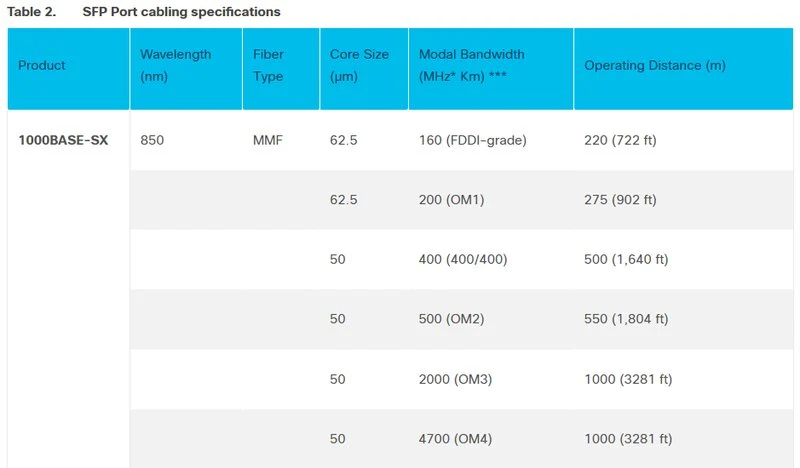
When ordering or troubleshooting SFPs, the manufacturer datasheet is incredibly helpful. It will tell you what you have, and what the specs for that are in different use cases, and it will even tell you the expected nominal power ratings for TX and RX.
Compatibility
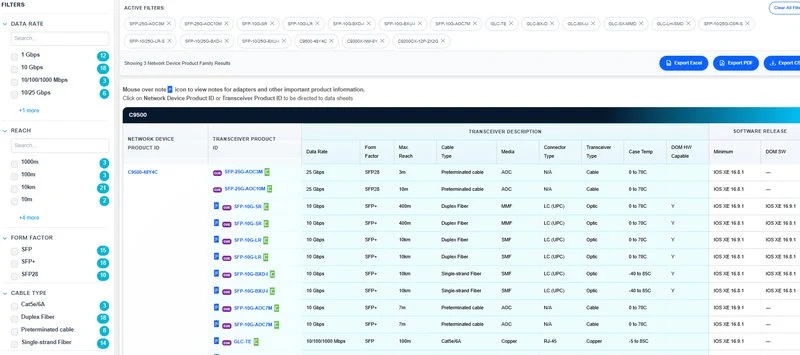
When ordering you also have to worry about compatibility with the gear that you are putting the SFPs into. Cisco as well as some other manufacturers usually have compatibility matrices so you can figure out which SFP is compatible with which card or what device. This is an example here. This new interactive version allows a lot more flexibility than the old static version. Once you populate it, you can even copy the URL it creates in the browser and send to someone else for them to also see exactly what you were looking at.
Consider
What are some things we need to consider when dealing with or designing fiber connections?
What sort of fiber might we typically use inside of a building, like between floors?
What sort of fiber might we typically use between buildings? Why?
Why not use SMF on short runs?
If a link is not coming up, what are a few things one might quickly check?
Other Interesting Bits
Fiber gives us a lot of flexibility. There are many other things that can be done than were covered in this presentation. Just to give a few of the uncommon options that you may still run into:
Bidirectional SFPs use a single strand of fiber. They do this by using one wavelength (lambda or color) for RX and a different wavelength for TX.
CWDM/DWDM are methods of effectively combining many discreet fiber paths over a single physical fiber path. The abbreviations stand for Coarse Wave Division Multiplexing and Dense Wave Division Multiplexing. These use many different wavelengths to multiplex many different fiber paths over a single path. These are more commonly used by service providers. Let's say I have 12 customers in the financial district down in lower Manhattan, and each of them also have offices up on the north of the island in Harlem. But I only have one fiber pair from lower Manhattan to Harlem. One potential approach to this problem is that I can take each of the 12 customers, assign them different wavelengths (colors) at a multiplexer, plug that into my fiber trunk, and then split them back out on the other side.
There are also incredibly high-speed links that can be done a variety of ways. For example 100G may work by combining 10 different fibers, or by using a version of CWDM, or some other approach. Just know that these ultra high-speed links (above 25Gb/s) often have a load of funky considerations that need to be taken into account, and there are many different approaches to them. Work closely with your vendors when designing for these types of links.
Further Reading
Here are some interesting links, papers, and books that can help shed more light (pun pun) on this subject.
“QED: The Strange Theory of Light and Matter” – by Richard Feynman
https://press.princeton.edu/books/paperback/9780691164090/qed
Cisco SFP Datasheet
Cisco SFP Modules for Gigabit Ethernet Applications Data Sheet - Cisco
Fiber Optic Basics
https://www.photonics.com/Articles/Fiber_Optics_Understanding_the_Basics/a25151
Fiber Optics and Physics
https://www.fiberoptics4sale.com/blogs/archive-posts/95048070-basic-optics-for-optical-fiber
Speed and Distance with Chart
https://www.lanshack.com/Fiber-Type-vs-Speed-and-Distance.aspx
Single vs Multi Mode
WDM
https://www.smartoptics.com/this-is-wdm/the-basics-of-wavelength-division-multiplexing-wdm/
DWDM/CWDM:
https://www.wwt.com/article/cwdm-or-dwdm-which-should-you-use-and-when
40 & 100G
https://www.curvature.com/resources/tech-guides/your-guide-to-40gbe-and-100gbe-optics/